Programme management

Build, track, and manage your programme from site

Create construction programmes, track progress activity-by-activity, and keep your whole team on the same page — from the office and on site.

14 days free. Cancel any time during the trial and you won't be charged.
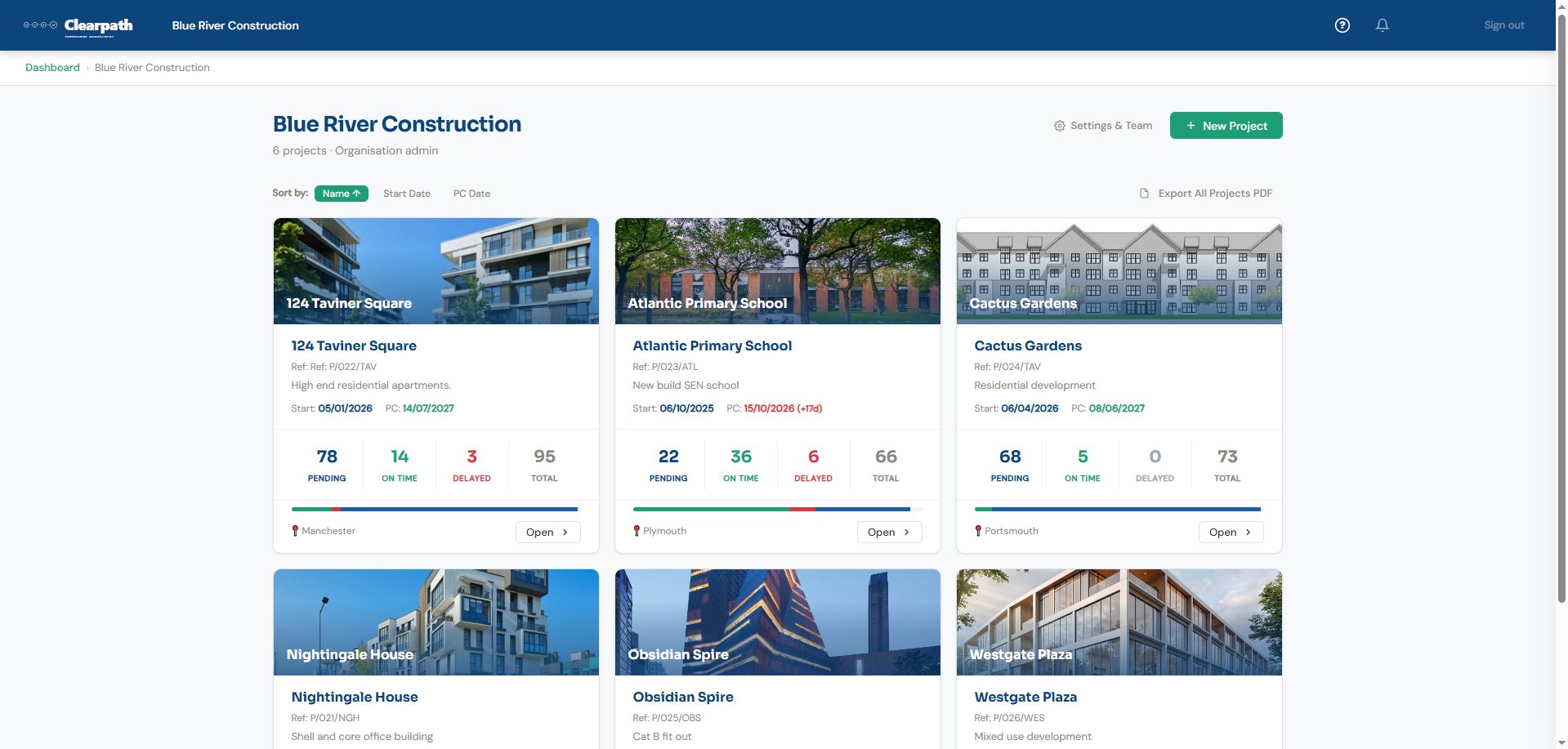
Clearpath organisation dashboard
Live programme tracking
Gantt chart with dropline
Site diary & daily summary
Programme comparison
Works on mobile

Your programme. Your control.

Clearpath is a cloud-based programme management platform for the construction industry. Whether you're a sole trader running a single project or a contractor managing a portfolio of sites, Clearpath gives you the tools to build, track, and report on your programme — all in one place.

See everything at a glance

The project dashboard and Gantt chart show you instantly what's on track, what's behind, and what needs attention — across every activity.

Update from site

Record actual dates, log delays, and fill in the site diary from your phone during a site walk. Everything syncs live — no emailing spreadsheets.

Manage your whole portfolio

The organisation dashboard shows activity counts and programme health across all your projects in one view. Spot problems early.

Your programme should tell you where you are — not where you were

On most construction projects, the programme is issued at the start and never properly updated. Within weeks it's out of date — activities have slipped, sequences have changed, and nobody trusts it any more. Clearpath keeps your programme alive. As actual dates are recorded, delays logged, and progress updated on site, the programme reflects reality — not a snapshot from three months ago. It becomes a tool your team actually uses, not a document gathering dust in someone's inbox.

📍
Actual dates replace planned dates

As activities start and finish, actual dates are recorded and the programme updates automatically. No manual re-issue required.

📊
Dropline shows real-time progress

The Gantt chart dropline deflects based on recorded percentage complete — giving you an honest, up-to-the-minute picture of programme health.

🔗
Logic links cascade changes

When an activity slips, logic links flag which downstream activities are now at risk — so the programme always reflects the current reality.

📄
Version history preserves the record

Every published version is locked and stored. You can always look back at what the programme said at any point in time — while the current version stays live and up to date.

Track, manage, and recover from delays

When delays happen, Clearpath helps you record them as they occur, understand their impact on the wider programme, and build the evidence you need to mitigate or recover lost time. Every delay is logged against the activity it affects, with the cause, duration, and any linked documents — giving you a clear, contemporaneous record from day one.

📍
Track delays as they happen

Record delay events against individual activities with dates, causes, and supporting evidence.

🔗
See the knock-on impact

Logic links flag at-risk activities automatically — so you can see which downstream work is threatened before it slips.

📄
Generate formal delay notices

Export formal delay notices and the full delay schedule as PDF — ready to issue when you need to protect your position.

📊
Compare programme versions

Demonstrate the impact of delays and variations — showing exactly what moved and by how much.

Everything you need to manage
your programme end-to-end

From building your programme through to tracking every activity on site, exporting reports, and managing delays.

Project dashboard

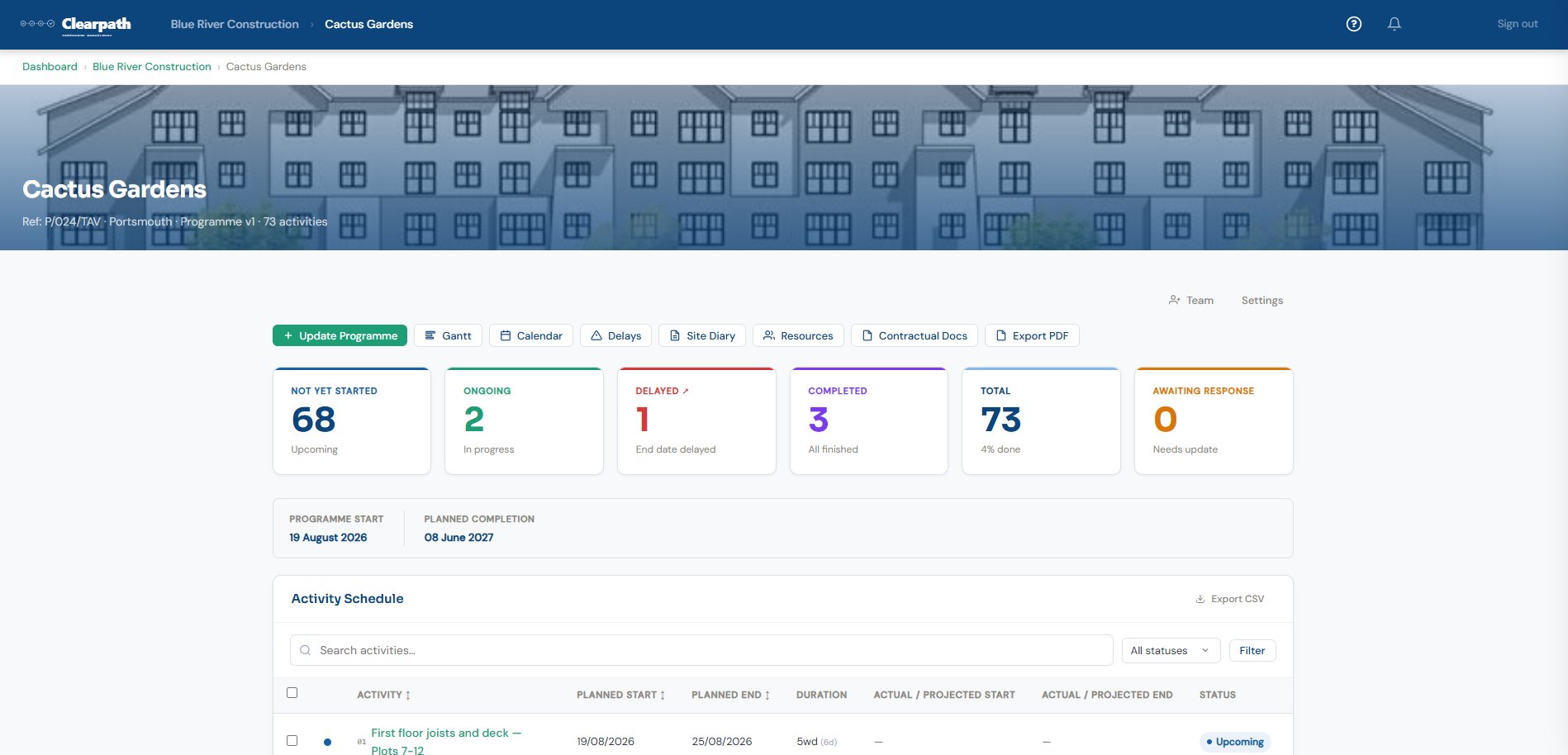
Everything you need to know about a project on one screen. Status cards break down your activities by status — not yet started, ongoing, delayed, completed, and awaiting response — with programme dates and quick links to the Gantt, delays, site diary, and more.

  • Colour-coded activity status breakdown
  • Programme start and planned completion dates
  • Quick access to Gantt, calendar, delays, site diary, resources, and relevant documents
  • Search, filter, and export activities
clearpath.app/projects/cactus-gardens
Project dashboard

Gantt chart with dropline

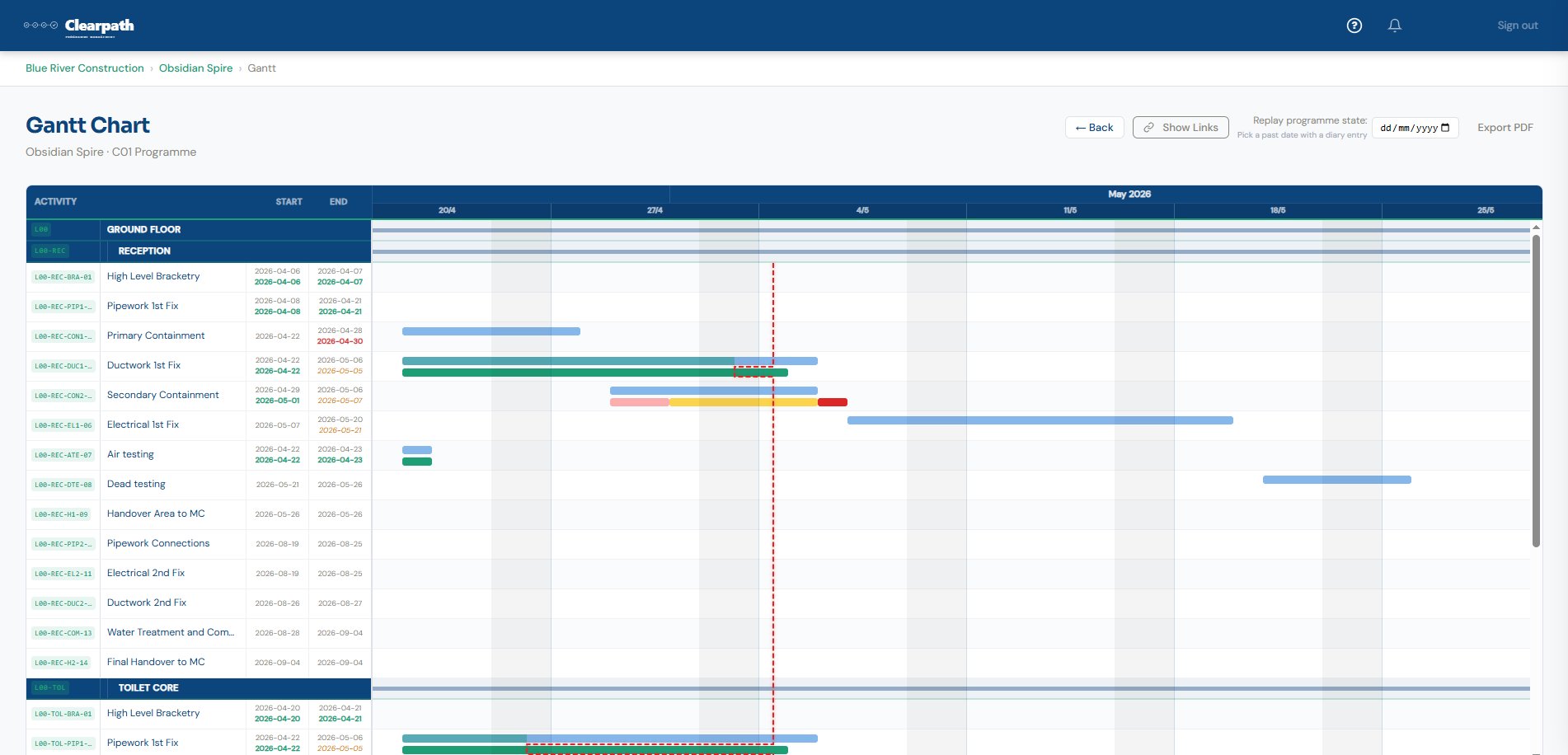
A live Gantt that actually tells you how you're doing. Activity bars show planned versus actual progress, with colour coding for completed, in-progress, delayed, and at-risk work. The dashed dropline deflects through in-progress activities based on recorded progress — giving instant visual confirmation of programme health.

  • Planned vs actual bars with colour-coded status
  • Dropline deflects based on percentage complete
  • Show logic links between dependent activities
  • Replay programme state at any past date
  • Export to PDF for reporting
clearpath.app/projects/obsidian-spire/gantt
Gantt chart

Programme builder

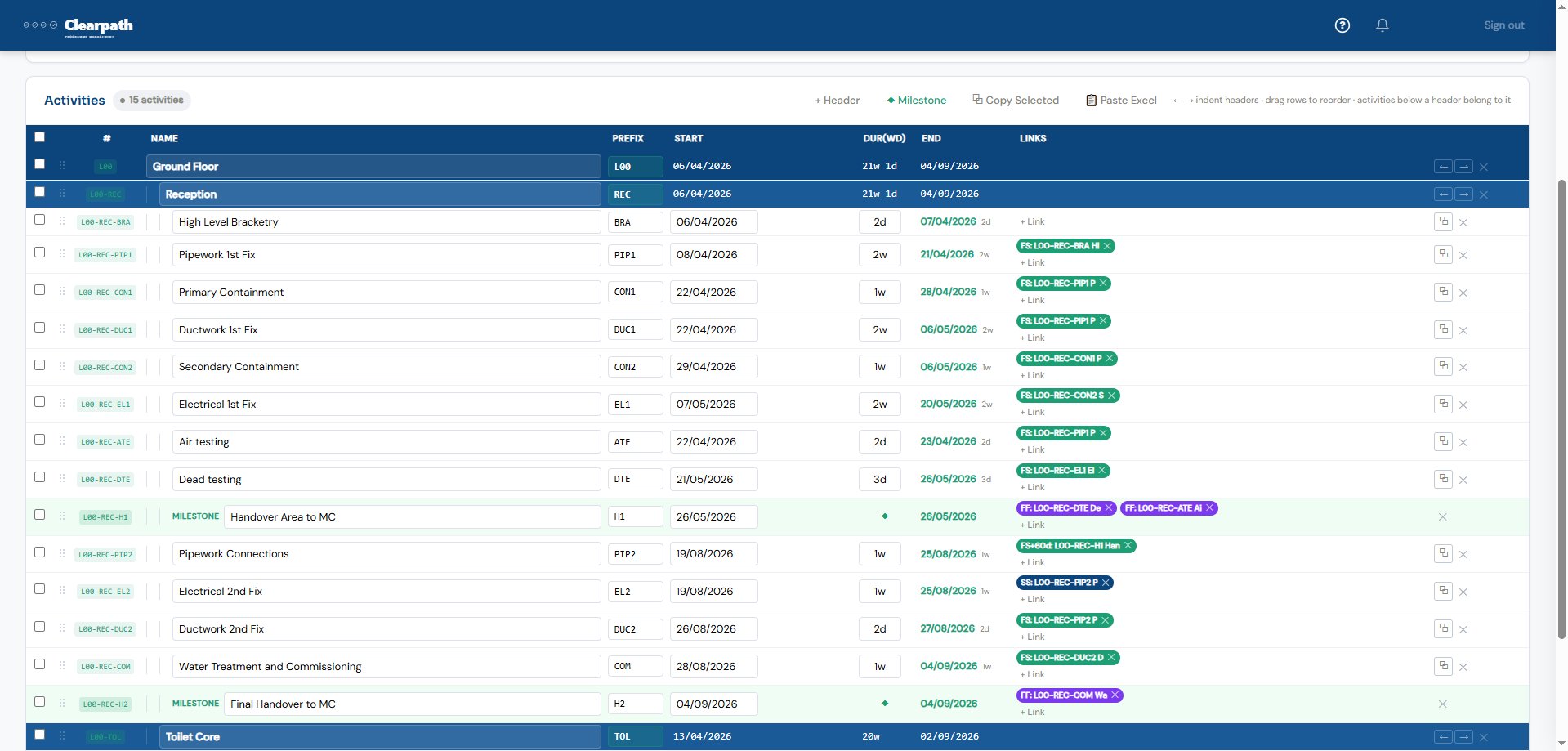
Build your programme directly in Clearpath with headers, sub-sections, activities, milestones, and logic links. Set durations in weeks and days, add dependencies between activities, and drag rows to reorder. You can also paste in CSV format from other programming software to import an existing programme.

  • Headers, activities, and milestones
  • Four logic link types: Finish-to-Start, Start-to-Start, Finish-to-Finish, and Start-to-Finish
  • Drag-to-reorder and indent under headers
  • Paste in CSV format from other programming software
  • Publish to lock your baseline
clearpath.app/projects/obsidian-spire/programme/edit
Programme builder

Delay schedule & at-risk activities

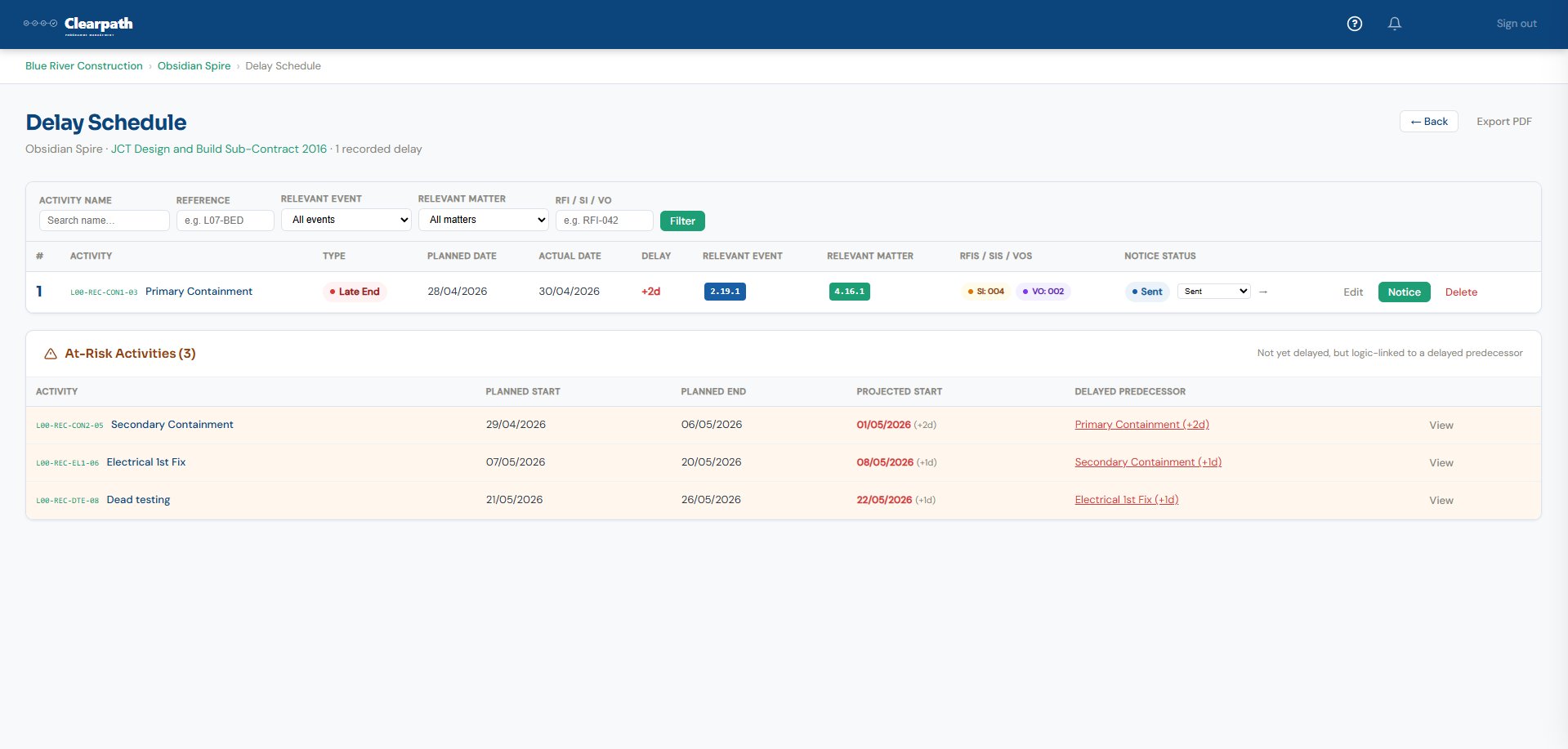
Every delay you've recorded rolls up into a filterable register showing which activities were affected, the delay in days, and the cause. Below the recorded delays, Clearpath automatically flags at-risk activities — those not yet delayed themselves, but logic-linked to a delayed predecessor.

  • Filterable by relevant event, matter, or RFI/SI/VO
  • Link delays to site instructions, variations, and RFIs
  • At-risk activities flagged automatically from logic links
  • Track delay notice status (sent, acknowledged)
  • Export full delay schedule and notices as PDF
clearpath.app/projects/obsidian-spire/delay-schedule
Delay schedule

Programme comparison

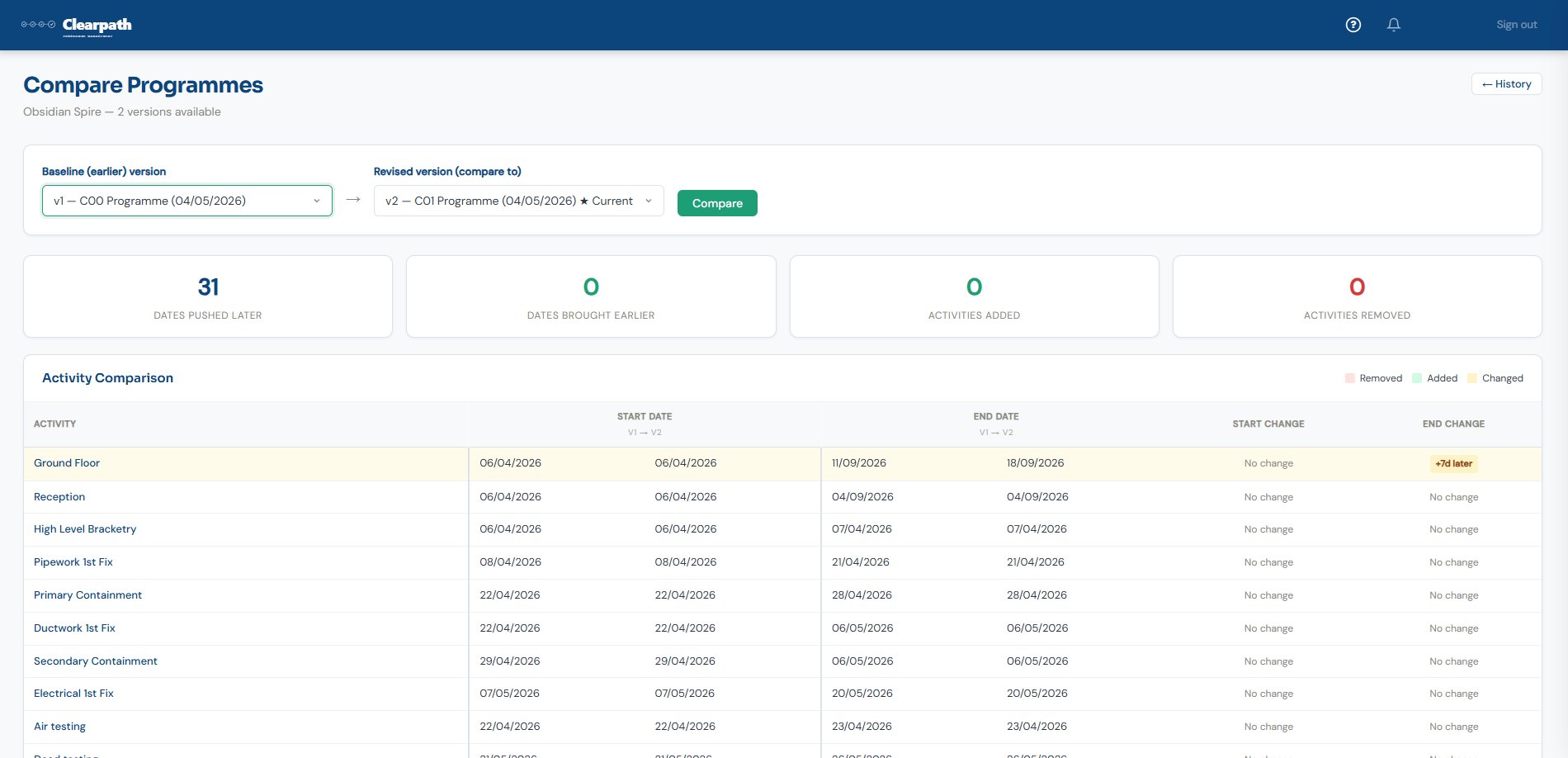
Compare any two programme versions side-by-side. See exactly which activities were pushed later, brought earlier, added, or removed — with a summary count at the top and a line-by-line activity comparison below.

  • Compare any two published versions
  • Summary: dates pushed, brought earlier, added, removed
  • Line-by-line start and end date comparison
  • Colour-coded change indicators
clearpath.app/projects/obsidian-spire/compare
Programme comparison

Organisation dashboard

See every project in your organisation at a glance. Each project card shows pending, on-time, and delayed activity counts with a progress bar, project cover images, and location. Sort by name, start date, or completion date.

  • All projects in one view with health indicators
  • Project cover images and locations
  • Sort by name, start date, or planned completion
  • Team management and settings
  • Export all projects as a summary PDF
clearpath.app/organisations/blue-river
Organisation dashboard

Relevant documents

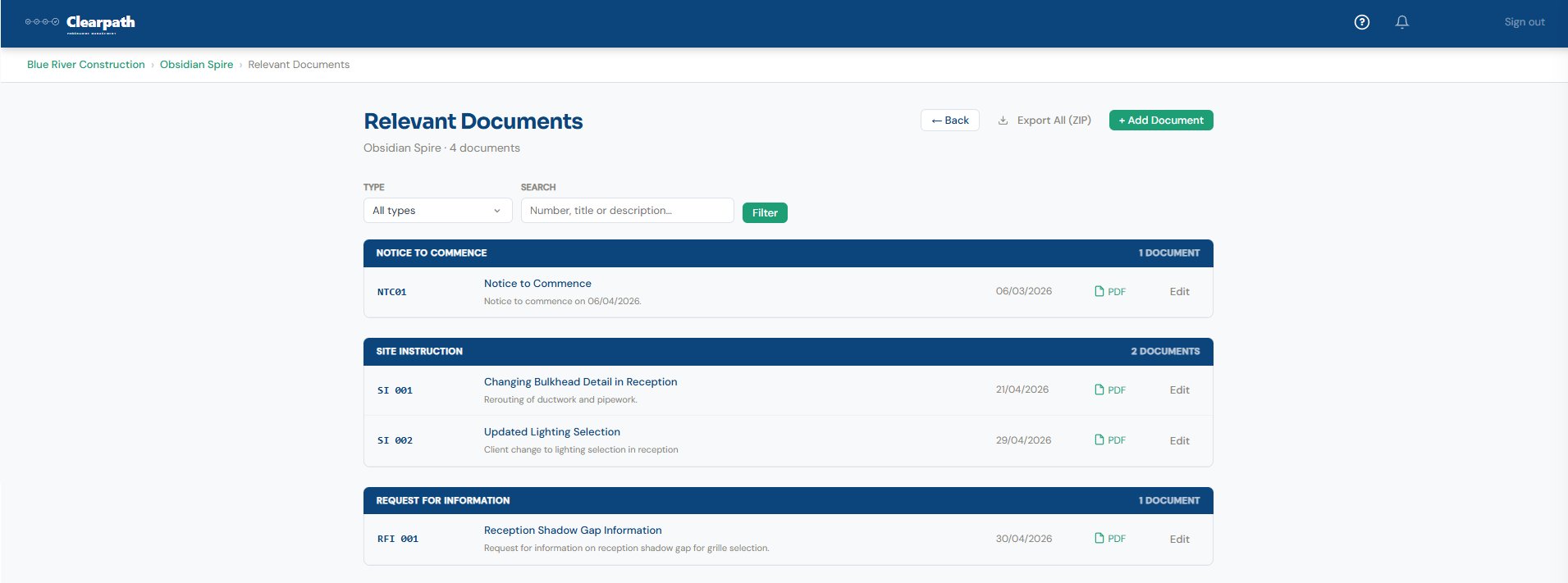
Store and manage all your project's relevant documents in one place — notices to commence, site instructions, RFIs, variations, and anything else. Each document is categorised, dated, and exportable as PDF.

  • Categorised by type: NTC, SI, RFI, VO, and more
  • Search and filter by type or keyword
  • Generate and export as PDF
  • Export all documents as a ZIP
  • Cross-reference from the delay schedule
clearpath.app/projects/obsidian-spire/documents
Relevant documents

PDF reports

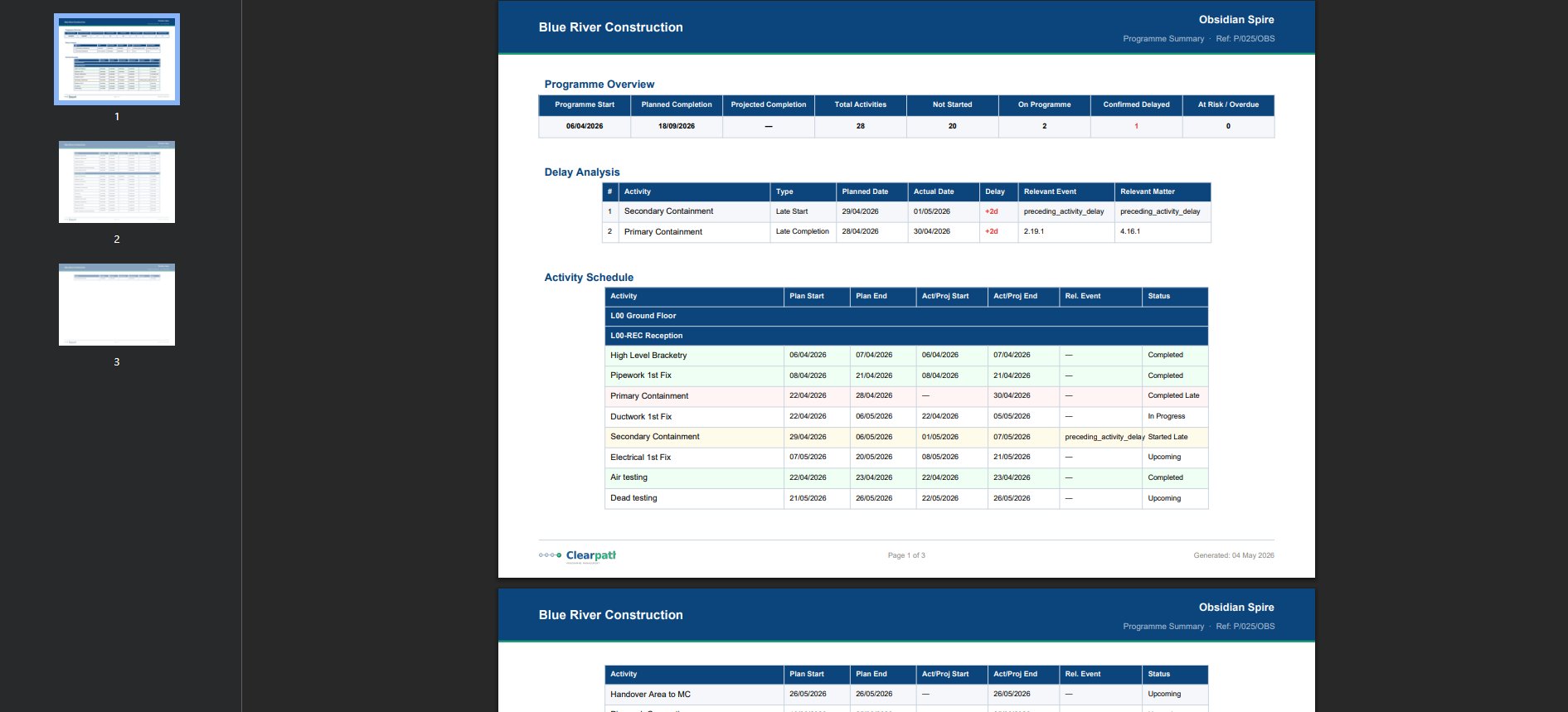
Export a complete programme summary as a professional PDF — with programme overview, delay analysis, and full activity schedule. Branded with your organisation name, project reference, and generation date.

  • Programme overview with key dates and activity summary
  • Delay analysis table with events and matters
  • Full activity schedule with planned vs actual dates
  • Multi-page with page numbers and branding
clearpath.app/projects/obsidian-spire/export-pdf
PDF report

Daily summary emails

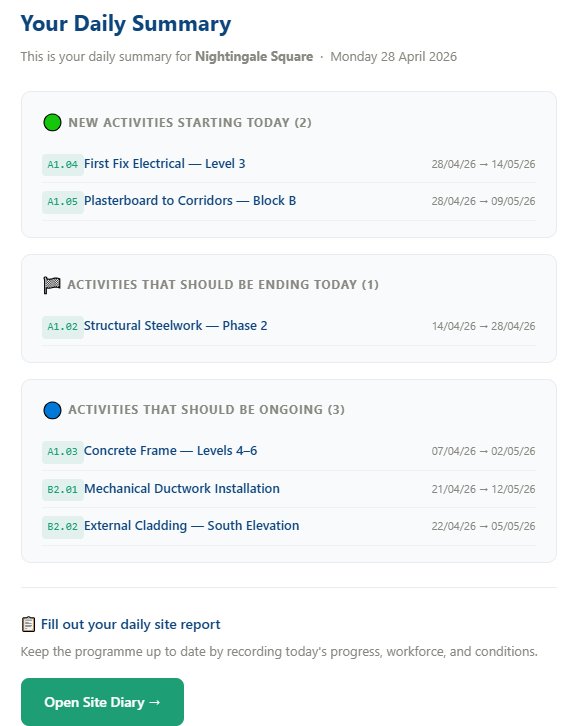
Every morning, Clearpath sends your team a daily summary for each project. It lists activities starting today, ending today, and ongoing — with reference numbers and dates. Plus a link straight to the site diary.

  • Automatic daily email to project team members
  • Activities starting, ending, and ongoing today
  • Direct link to open the site diary
  • No login required to read the summary
Email — Daily Summary
Daily summary email

Every tool you need

📋

Site diary

Shared project diary for the whole team. Log workforce by trade, weather, photos, and activities in progress. Entries lock automatically at midnight.

📅

Working day calendars

Configure bank holidays, shutdowns, and site-specific exceptions. All date calculations use working days, not calendar days.

📄

Programme versioning

Publish new programme versions and compare them side-by-side. The original baseline stays locked.

📱

Mobile PWA

Works in the browser on any device. Add to your home screen for quick access on site walks — no app store required.

👥

Team & permissions

Invite team members to your organisation and projects. Manage roles and access from one place.

📥

CSV import & export

Import programmes from other scheduling software via CSV, and export your activity schedule and reports at any time.

Up and running in minutes

No training courses. No consultants. Create your project, build your programme, and start tracking.

1

Create your project

Set up your organisation, invite your team, and configure your working day calendar.

2

Build your programme

Add activities, headers, milestones, and logic links. Or paste in CSV format from other programming software. Publish to set your baseline.

3

Track on site

Record actual dates and progress as you go. Fill in the site diary from your phone.

4

Stay on top of it

Monitor the dashboard and Gantt. Export PDF reports. Keep your team informed with daily summaries.

Ready to take control of your programme?

Join contractors who manage their programmes with clarity — from the office and on site.